

![UltraSatan [Atari ST]](https://www.jungsi.de/blog/wp-content/uploads/2013/02/Ultrasatan1.jpg)
Anyone who has been following my blog for a while will already be familiar with my posts on the SatanDisk and the GigaFile. In 2013, the new version of the so-called UltraSatan was released. This device was unavailable for a long time (except at inflated prices on eBay). Now, the Polish developer known from my posts, Lotharek – whom you’ll recognise from my posts – has released a new version, having first secured permission from the original developer Jookie. Preparatory work began as early as last autumn, and deliveries took place in the second half of March.
Here is a brief translation of the description for UltraSatan by Jookies website:
Why that name?
- The project name is derived from the previous project – SatanDisk. UltraSatan is the improved successor to SatanDisk – hence ‘Ultra’
- It has nothing to do with Satanism or the occult
Why UltraSatan?
- for the same reason as “Why SatanDisk?” (MMC and SD cards are cheap, quiet, etc.)
- It has two slots for SD/MMC cards, so it replaces two SatanDisks on a computer
- The SD/MMC cards are ‘hot-pluggable’, i.e. the device does not need to be switched off to change the card
- has a battery-backed clock chip
- Up to four different firmware versions can be loaded without the need for additional hardware
- It has a basic firmware, so the device should continue to work even if a firmware upgrade goes wrong
- is faster than the SatanDisk
Specifications:
- is connected to the ACSI port of the Atari ST
- Supports MMC, SD and SDHC cards – tested with cards ranging from 16MB to 8GB
- Drivers: ICD Pro (free) and HDDriver (commercial)
- Open source – all schematics, firmware and source code are freely available, so anyone can build it themselves
- The name of the device can be changed (the name that appears when the hard disk driver displays the connected devices)
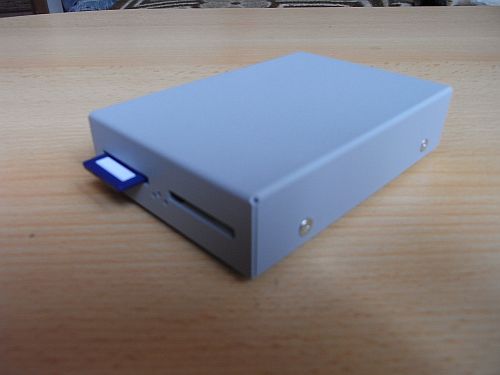
The Lotharek website offers both an internal and an external version. Suitable adaptors are available for installation in the Atari Mega ST and Mega STE. The DB19-ACSI cable is also available, which is required for the external connection. The external unit also requires a power supply unit with a micro-USB port, as is common with mobile phones.
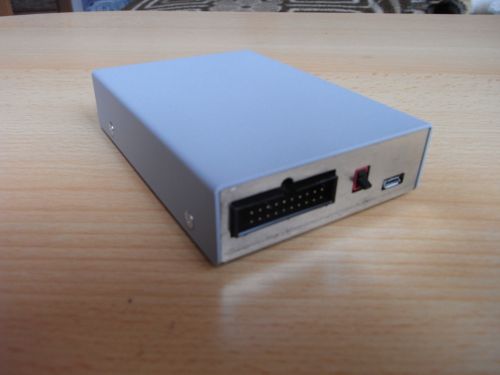
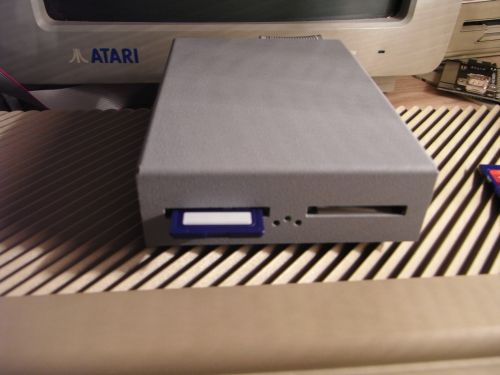
As a pre-order customer, I secured the external device and received an ACSI cable and a pre-configured SD card free of charge. The device looks very high-quality – the circuit board is housed in a sturdy casing in the typical Atari grey. There is a power switch on the back. The SD card slots are of a rather simple design and not quite as high-quality as those in Wolfgang Förster’s GigaFile.
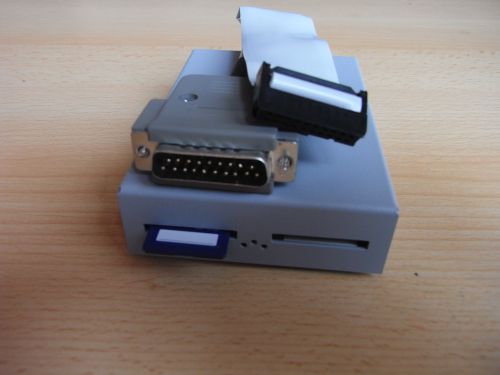
The first time you use it, it’s practically plug-and-play: connect the device, switch it on (the LEDs flash briefly), insert the supplied card and start up the computer. The ICD driver installed on the card runs without any problems; the desktop is already set up. The demos on the second partition can be launched without any problems. I then inserted a card prepared for the GigaFile using HDDriver into the second slot, briefly restarted the computer, and ICD immediately recognised the second card and its partitions. After booting up, simply mount the drives and you can access the data on the second card straight away.
Next test: booting with a card set up using HDDriver – UltraSatan and the card were recognised, but then the error message appeared: “Error reading partition data”! After attempts to set up other cards with HDDriver repeatedly failed due to the same error, I emailed Lotharek and received a reply straight away: the error was indeed down to HDDriver. So I immediately emailed Uwe Seimet, the programmer behind HDDriver, and very quickly received the latest version of the driver, ‘8.46’. I simply updated the driver on the existing SD card – and straight away, booting with HDDriver worked!
Next, I set up a second SD card – one that’s compatible with Windows – it’s almost impossible to make switching between the two worlds any easier. 🙂
You don’t always have to reset the Atari to exchange data – if you use the HDDriver, the ‘mediachange’ programme takes care of it.
There is now also an alternative driver from Pera Putnik, which is optimised for the UltraSatan (it is not as versatile as HDDriver) and costs just €10!
The software is available here: PP Hard Disk Drivers
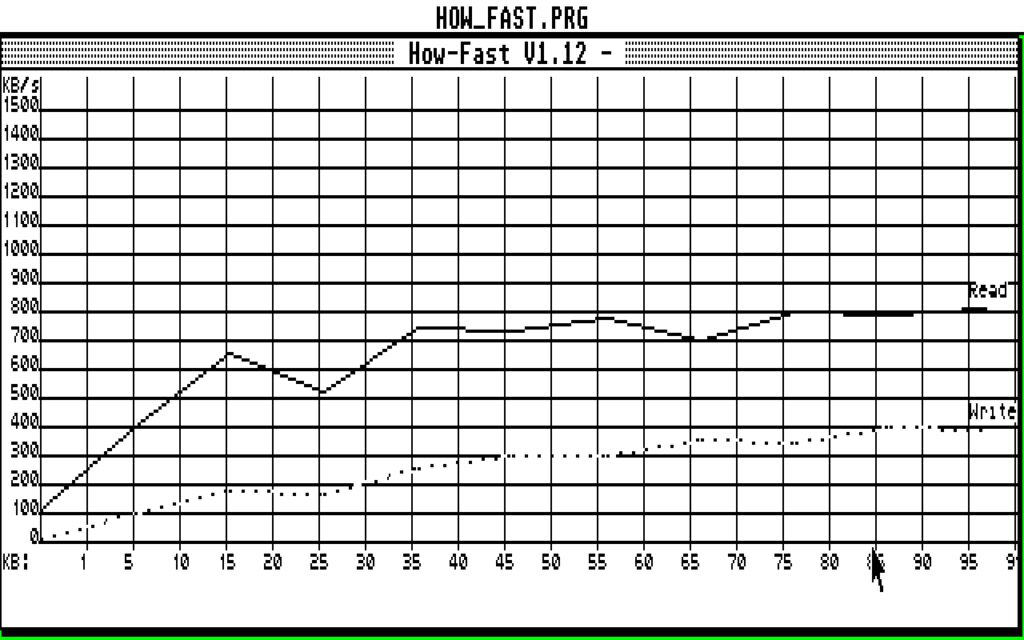
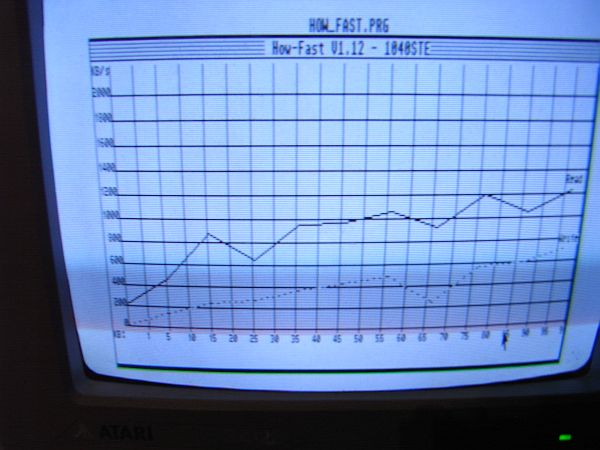
As with the GigaFile, I’ve carried out a speed test here using HowFast. My hunch was confirmed: whilst the UltraSatan is faster than the SuperSatan (another ACSI storage device from my collection), it is nowhere near as fast as the GigaFile. The measured read speed was between 700 and 800 kb/s, whilst the GigaFile reached almost 1,200 kb/s.
A handy side effect is the clock built into the UltraSatan—the clocks on my Atari gave up the ghost long ago, but the Satan gets around this issue. There is a small program available to set the clock. If the appropriate software is placed in the AutoStart folder, the clock stays up to date.
The software can be found here.
Update 2026
After 13 years, Lotharek has revised the hardware. The most significant new feature is the integration of a USB-SPI flash programmer. Its operation is very simple: connect the UltraSatan to a PC via USB-C without an SD card inserted. Then, using the appropriate software, you can revive the UltraSatan if a firmware issue causes a loss of functionality.
Additionally, the PCB has been upgraded from a 2-layer to a 4-layer design, eliminating the need for components on the underside.
For use in a MegaST, two pins on the underside can be connected, allowing the device to be powered via the ACSI port and removing the need for a separate power cable inside the computer.
Conclusion
A fantastic device—perfect for rapid data exchange with the PC world. If speed is a priority, the GigaFile is simply a must-have!
![NetUSBee [Atari ST]](https://www.jungsi.de/blog/wp-content/uploads/2013/11/NetUSBee-6.jpg)
![Shotgun [Atari ST]](https://www.jungsi.de/blog/wp-content/uploads/Shotgun-ST-Startscreen.jpg)
![SMM804 [Atari]](https://www.jungsi.de/blog/wp-content/uploads/SMM804_2.jpg)
Leave a Reply