

![NetUSBee [Atari ST]](https://www.jungsi.de/blog/wp-content/uploads/2013/11/NetUSBee-6.jpg)
The NetUSBee is a network card with two USB ports for the Atari ST’s ROM port. I believe I purchased the first version of this card back in 2006. Since then, it has been available in small batches from various sources. It has now been re-produced in larger quantities by the Polish specialist Lotharek. The circuit board was developed by Candle’O’Sin. This means I can also fit my Atari 1040 STE with one of these small modules and ‘retire’ the good old Ethernet module.
The latest version of Lotharek comes in a sturdy grey metal case that matches the colour of Atari computers well. As you can clearly see from my photos, the new circuit board is larger than the old one and the position of the connectors has been changed. Following a tip from an Atari forum, I realised that whilst the casing provides excellent protection for the circuit board, the extra weight pulls the board downwards, which presumably puts quite a strain on the ROM port. This can be remedied with ‘feet’ – I got myself some self-adhesive transparent ‘furniture pads’ for this purpose – 8 mm high.
Source: Netusbee – cased – full USB + LAN
Technical data
| feature | Value |
|---|---|
| Network chip | RTL8019AS, as used by EtherNEC, backward-compatible with drivers |
| USB-Chip | ISP1160, as used in EtherNAT |
| PCB dimensions | 47 x 65 mm |
| Compatibility | ST(e), Mega ST(e), Falcon, TT |
| IRQ | Optional interrupt line to accelerate transfers and provide more CPU time for applications. |
| LEDs | Power supply, network connection, network transmission |
| Connection | Cartridge-Port / ROM-Port |
The card is quickly connected – now all you need is the right software to be able to use it.
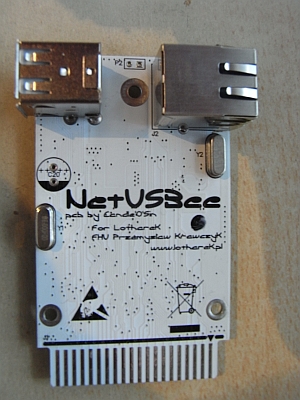 | 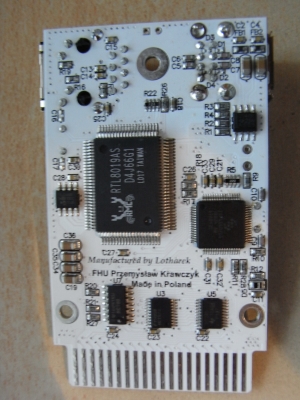 |
Here is a simple guide on how to configure the software for the NetUSBee.
STING
For this option, you need the *Sting* TCP/IP stack, the network card driver (*enec.stx*, *enec3.stx*) from the Ethernet package, and the *qed* editor (or any other editor capable of inserting actual tab characters). You should also have utilities on your computer for extracting ZIP and LZH archives. If you wish to use TOS without multitasking, the system extension *wdialog.prg* must be installed. Finally, *Xcontrol* should also be installed.
Plug the network card into the ROM port of the switched-off (!) Atari. Then start the computer. The folders ‘auto’ and ‘gemsys’ should be created on the boot drive. I suggest creating a further folder ‘data’ for the compressed files. It is also advisable to place the user programmes in a separate folder, e.g. ‘apps’. Unpack the Sting package and move the files from the unpacked Auto folder to c:\auto\. The folders ‘sting’ and ‘cpx’ are placed in c:\gemsys\. From the Ethernet package, extract only the file enec.stx (for 68000 Ataris) or enec3.stx (for 68030 Ataris) and place it in c:\gemsys\sting\.
This ensures that the necessary files for using TCP/IP are in place.
Next, launch the editor qed (or your preferred alternative) to modify a few files:
1. Enter the path c:\gemsys\sting\ in the file c:\auto\sting.inf.
2. Add the following line to the file c:\gemsys\sting\route.tab:
0.0.0.0[TAB]0.0.0.0[TAB]EtherNet[TAB][Router IP address]
The tabs must be actual tab characters; otherwise, you might be puzzled later when things don't work. Other lines, such as comments, are disabled by placing a '#' at the beginning.
3. Modify the entry in the file c:\gemsys\sting\default.cfg:
NAMESERVER = [IP address of the nameserver]
Now open the Sting Port Setup module in the control panel and select the ‘Ethernet’ connection. Enter an IP address within the IP range managed by the router. Set the subnet mask to ‘255.255.255.0’. The ‘active’ box should be ticked. Under ‘General’, select the hardware ‘NE2000’. Save the changes, which will create the file ‘sting.prt’ in c:\.
After restarting, the network connection should be available.
The required software can be found in my article on the Ethernet module, as the software is the same.
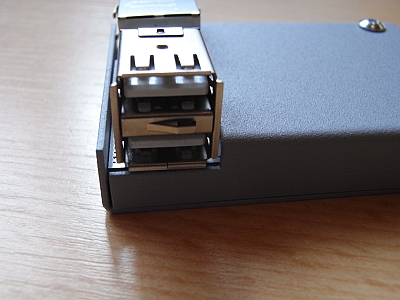 | 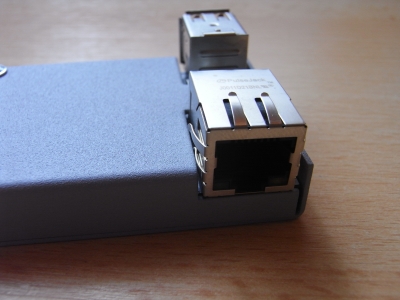 |
USB ports
Contrary to initial appearances, driver development for the NetUSBee's USB interface did not stop at a simple mouse driver. Over the years, the FreeMiNT project (specifically the *USB4TOS* initiative) has produced a comprehensive driver suite: in addition to mice and keyboards, support now extends to USB mass storage devices (such as flash drives and card readers) and a printer driver, with some USB graphics tablets also supported. Furthermore, the transfer speeds of the mass storage drivers have seen significant, repeated improvements.
However, things still do not run entirely smoothly. Driver reliability varies depending on the computer, CPU speed (especially in accelerated "Turbo" mode), and the TOS/MiNT version, and occasional error reports still surface. Anyone wishing to use more than just a mouse with the NetUSBee should check the latest driver packages and the current development status of the FreeMiNT project beforehand.
Not every mouse works—here is a handy list of compatible devices: Compatibility list for USB mice for NetUSBee
A short article about it can be found here: USB Mouse on the Atari ST (the driver for the mouse is also available there)
![Atari Mega ST 2 [Atari]](https://www.jungsi.de/blog/wp-content/uploads/2014/03/Atari-Mega-ST-2.jpg)
![Anarcho Ride – Update 2019 [Atari STE]](https://www.jungsi.de/blog/wp-content/uploads/anarcho-ride-titel-screen.jpg)
![MonSTer [Atari ST]](https://www.jungsi.de/blog/wp-content/uploads/atari-st-monster.jpg)
Hallo Jungsi,
versuche gerade bei meinem 1040 STE NetUsbee mit Sting in Betrieb zunehmen… Leider finde ich den enec.stx Treiber nirgends und das im Artikel erwähnte „Ethernet-Paket“ sagt mir leider nichts bzw. verstehe nicht genau was mit dem Paket gemeint ist. Hab die Files im EtherNec Artikel geprüft, aber kein „enec.stx“ – Gibt es einen bekannten Link wo man die Treiber auch findet? Oder gibt es ggf. eine Möglichkeit den Treiber irgendwo zur Verfügung zu stellen? (Falls die Treiber nicht urheberrechtlich geschützt, natürlich)
Aber schon mal besten Dank fürs berichten von deinen Erfahrungen.
Danke und Gruss
Nevermind, war gestern wohl zu spät für mich. Hab‘ die Treiber gestern bei lotharek gefunden 🙂